0 ratings




Item #:
16536883
Typing Instructor for Kids Platinum 5
Item #:
16536883
OMR 16
Price Details
Excluding Shipping & Custom charges ( Shipping and custom charges will be calculated on checkout )
*All items will import from US
In stock
 Imported from USA store
QTY:
Order now and get it around Wednesday, June 24
Secured transaction
Ubuy works hard to protect your security and privacy. Our advanced payment security system ensures confidentiality by encrypting your information during transmission using AES (Advanced Encryption Standards) and SSL (Secure Socket Layer) protocols. Your payment details are 100% secure as we do not share your payment details with third party sellers.
Our Top Logistics Partners


The Ultimate Typing Tutor to Teach Kids to Type

Fast
Shipping

Free
Return*

Secure Packaging

100% Original Products

PCI DSS Compliance

ISO 27001 Certified


Note: Step Down Voltage Transformer required for using electronics products of US store (110-120). Recommended power converters Buy Now.


What Stands Out
Engaging Content
Features interactive lessons and games designed to capture kids' attention while teaching typing skills in a fun way, encouraging consistent practice and reducing frustration.
Comprehensive Curriculum
Offers a structured approach with gradual skill progression, allowing children to build confidence and proficiency in typing at their own pace, making it suitable for various learning styles.
Customization Options
Includes customizable settings that enable parents to adjust difficulty levels, monitor progress, and tailor the learning experience to meet individual needs, enhancing overall effectiveness and engagement.
Product Details
- The Ultimate Typing Tutor to Teach Kids to Type
- Kids can Learn in English or Spanish
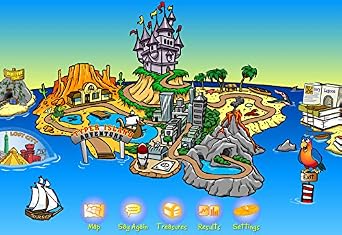
- Island Adventure Theme Motivates Kids to Learn to Type or Improve their Typing Skills
- Exciting Typing Games, Challenges, Lessons, and Tests Build Skills
- Choose the Perfect Typing Plan by Age & Skill Level, Starting with the Home Row Plan
- Teaches Keyboard Basics Following one of 11 Age-Appropriate Typing Plans – Meets National, State, & Common Core Standards
- Typing Instructor is a registered trademark & box images and screenshots are copyrights of Individual Software Inc.
- Product is Delivered in a Closed Factory Fresh Box and Includes the Current Version & Unused Activation Code
- Free Technical Support! If you need assistance installing or activating the product, or with any other product-related issue, call Customer Care
| Is Discontinued By Manufacturer | No |
| Language | English |
| Product Dimensions | 5.35 x 1.1 x 7.5 inches (13.6 x 2.8 x 19.1 cm); 3.84 ounces (108.86 grams) |
| Our Recommended age | 5 - 20 years |
| Item model number | EMM-TK5 |
| Date First Available | October 20, 2009 |
| Manufacturer | Individual Software |
Who Should Buy?

-
Young Learners
Ideal for children aged 7-12 to develop typing skills through engaging lessons and interactive games.
-
Classroom Use
Great for teachers seeking a fun software to incorporate typing practice into their curriculum.
-
Parents Concerned
Excellent for parents wanting to improve their child's typing speed and accuracy in a safe, monitored environment.

-
Older Students
Not suitable for teens or adults looking for advanced typing techniques or professional-level training.
-
Casual Users
May not appeal to those who only need basic typing skills or prefer informal practice methods.
-
Budget-Conscious
Potentially expensive for families or schools with limited budgets, given the availability of free typing resources.
Product Description
Have any Query? Chat with us
Customer Questions & Answers
-
Question:
What is Typing Instructor for Kids Platinum 5?
Answer: Typing Instructor for Kids Platinum 5 is an interactive typing software designed to teach children the fundamentals of touch typing. Its engaging lessons utilize fun characters and activities aimed at making keyboarding skills enjoyable. This program features various games and challenges, helping kids improve their typing speed and accuracy while maintaining their interest through fun storytelling and rewarding progress. -
Question:
What are the key features of Typing Instructor for Kids Platinum 5?
Answer: Key features of Typing Instructor for Kids Platinum 5 include a variety of engaging typing lessons, interactive games, and customized learning paths tailored to individual skill levels. The software also offers colorful animations and educational tools that keep students motivated. Additionally, it provides performance tracking and reporting tools for parents and teachers to monitor progress, ensuring an effective and personalized learning experience. -
Question:
Is Typing Instructor for Kids Platinum 5 suitable for beginners?
Answer: Yes, Typing Instructor for Kids Platinum 5 is specifically designed for beginners. It introduces typing concepts gradually and provides a supportive environment where kids can build confidence as they learn. The lessons start with basic key placements and progress to more complex tasks, catering to children of different ages and experience levels, making it an ideal choice for every young learner. -
Question:
Can Typing Instructor for Kids Platinum 5 be used on multiple devices?
Answer: Typing Instructor for Kids Platinum 5 is compatible with various devices, allowing for a flexible learning experience. Children can use it on Windows and Mac OS, enabling access on desktops, laptops, or compatible tablets. This flexibility means that kids can practice typing at home, at school, or even while traveling, helping to reinforce their skills in different environments. -
Question:
How long does it take to learn touch typing with Typing Instructor for Kids Platinum 5?
Answer: The time it takes to learn touch typing with Typing Instructor for Kids Platinum 5 varies by individual, as it depends on how frequently children practice and their learning pace. With regular use, many kids can expect to see noticeable improvements within a few weeks. The structured lessons and engaging games motivate consistent practice, helping children develop typing skills effectively over time. -
Question:
Is Typing Instructor for Kids Platinum 5 suitable for all ages?
Answer: While Typing Instructor for Kids Platinum 5 is primarily aimed at children aged 5 to 12, its fun and engaging approach to learning can appeal to a broader age range. The software offers adjustable difficulty levels, allowing older students or even adults to benefit from the lessons. This versatility makes it an excellent tool for anyone looking to improve their typing skills in an enjoyable way. -
Question:
Does Typing Instructor for Kids Platinum 5 require an internet connection?
Answer: No, Typing Instructor for Kids Platinum 5 does not require a continuous internet connection for its core functionalities. Once installed, children can access the lessons and games offline, ensuring that they can practice typing anytime, anywhere. However, some features, such as downloading additional content or accessing online resources, may require a brief connection. -
Question:
What types of games are available in Typing Instructor for Kids Platinum 5?
Answer: Typing Instructor for Kids Platinum 5 includes a variety of fun typing games that make learning engaging. Games range from racing against the clock to spelling challenges, incorporating popular characters and storylines that appeal to children. This gamified approach not only enhances typing skills but also promotes critical thinking and problem-solving abilities, making the learning process enjoyable. -
Question:
How can parents monitor their children’s progress in Typing Instructor for Kids Platinum 5?
Answer: Parents can easily monitor their children's progress in Typing Instructor for Kids Platinum 5 through its built-in reporting features. The software generates performance reports that detail typing speed, accuracy, and improvement over time. This valuable insight allows parents to track their child's development, provide encouragement, and identify areas where additional practice may be needed. -
Question:
Where can I buy Typing Instructor for Kids Platinum 5 in Oman?
Answer: You can purchase Typing Instructor for Kids Platinum 5 from Ubuy, which offers a user-friendly platform for finding and buying this product. Ubuy makes it convenient to browse various available options, ensuring you can access the best deals and product information all in one place.
Individual Software Games EMM-TK5 Editorial Review
The Typing Instructor for Kids Platinum 5 software is a popular choice for homeschooling families looking for an interactive and engaging typing program for their children. The program offers different difficulty levels, making it suitable for kids of various ages and skill levels. Users are also pleased with the lack of pop-up ads, creating a distraction-free learning environment. However, there are a few issues that some customers have encountered. There have been reports of invalid activation keys and the need for internet access in order to activate the program, even when using a CD. Some users have also expressed frustration with the short window of time allowed for using the software, which requires purchasing a new product key after a certain period. Overall, the Typing Instructor for Kids Platinum 5 software is well-liked for its ease of use and engaging interface, making it an effective tool for teaching kids typing skills. However, potential buyers should be aware of the potential issues mentioned above.
Customer Reviews & Ratings
689 customers ratings
-
5 Star
52%
-
4 Star
17%
-
3 Star
7%
-
2 Star
9%
-
1 Star
15%
Review this product
Share your thoughts with other customers
Pros
- Easy to set up and use
- Interactive and engaging for kids
- No pop-up ads
Cons
- Reports of invalid activation keys
Product Price History
Important information
- Limitations : For products shipped internationally, please note that any manufacturer warranty may not be valid; manufacturer service options may not be available; product manuals, instructions, and safety warnings may not be in destination country languages; the products (and accompanying materials) may not be designed in accordance with destination country standards, specifications, and labeling requirements; and the products may not conform to destination country voltage and other electrical standards (requiring use of an adapter or converter if appropriate). The recipient is responsible for assuring that the product can be lawfully imported to the destination country. When ordering from Ubuy or its affiliates, the recipient is the importer of record and must comply with all laws and regulations of the destination country.
- Not all the products listed on Ubuy are for sale, as Ubuy is a global search engine. Products are subject to export/trade regulations.
OMR 16
Order now and get it around Wednesday, June 24
This item is not restrict in my country.(Please click on above link if this item is not restrict in your country, So our team will review and allow.)
QTY:
Secured transaction
Ubuy works hard to protect your security and privacy. Our advanced payment security system ensures confidentiality by encrypting your information during transmission using AES (Advanced Encryption Standards) and SSL (Secure Socket Layer) protocols. Your payment details are 100% secure as we do not share your payment details with third party sellers.
Our Top Logistics Partners
Fastest cross-border delivery
Features & Benefits
- Can learn in English or Spanish
- Island Adventure Theme for motivation
- Exciting Typing Games, Challenges, Lessons, and Tests
- 11 Age-Appropriate Typing Plans to Build Skills
- Meets National, State, & Common Core Standards
- Free Technical Support Included